


Snapchat is quickly becoming a powerful channel for social media marketing. According to Forbes, Snapchat users are “hungrier for content” and “pay more attention to content” due to the low amount of noise on the platform. Snapchat also has “enormous power over young demographics.” The downside? There are “no options for small businesses … [and] it costs tens of thousands of dollars for most campaigns”—until now.
With TrueLoyal, you can begin a Snapchat campaign today for a fraction of the cost of Snapchat’s limited advertising options.
Snapchat is a challenging network to leverage, because it does not have an API for third-party applications. This means that we can’t automatically aggregate content from Snapchat like we do with other networks on the TrueLoyal platform. But good news—there are plenty of ways to establish and grow your brand on Snapchat with TrueLoyal and TrueLoyalmix. Some assembly required 😉
Tip 1: Display Your Brand’s Snapcode in a TrueLoyalmix
A “Snapcode” is a QR code that Snapchatters love using to add each other easily on Snapchat. All they need to do is open Snapchat on their phone, point the camera at the Snapcode, and tap on the code to follow someone. Since Snapcodes were released, a trend has grown among brands and social media influencers of using Snapcodes in creative ways—in profile photos, YouTube videos, or even print ads. Now you can put your Snapcode up in lights with TrueLoyalmix!
- Log in to snapchat.com with your brand’s Snapchat account. Don’t have one yet? Get the app here and register your username.
- Go to snapchat.com/accounts/snapcodes, log in, and download your high-quality snapcode images.
- Edit your Snapcode image and add branding as desired. The easiest thing to do is to delete the white portion in the middle and repaint it. See Snapcode brand guidelines here. We recommend making the Snapcode large in your final TrueLoyalmix image so that your audience can add it from a distance with their phones. Including text with your username in large font is also helpful. Here is an image we whipped up for @teamTrueLoyal in just a few minutes:

4.Create a TrueLoyalmix and add your Snapcode as an image alongside your TrueLoyal. For the image we created above, a vertical split makes the most sense, but feel free to get creative.

Engaging Your Community by Getting Your Content From Snapchat
Because Snapchat has decided to crack down on third-party apps, a little bit of elbow grease is required to get Snapchat content into your TrueLoyal. Thankfully, TrueLoyal’s mobile app and custom-post feature minimize the work required to get community snaps displayed on your TrueLoyal.
1. Tell your audience to add your brand on Snapchat (using Snapcodes or your username, as above) and Snap you or message you directly. Here, we created a simple banner for our TrueLoyalmix to inform our audience:

2. In Snapchat’s private messaging, tap and hold a photo to tell Snapchat to keep it around. Click on the message to open the content full-screen.
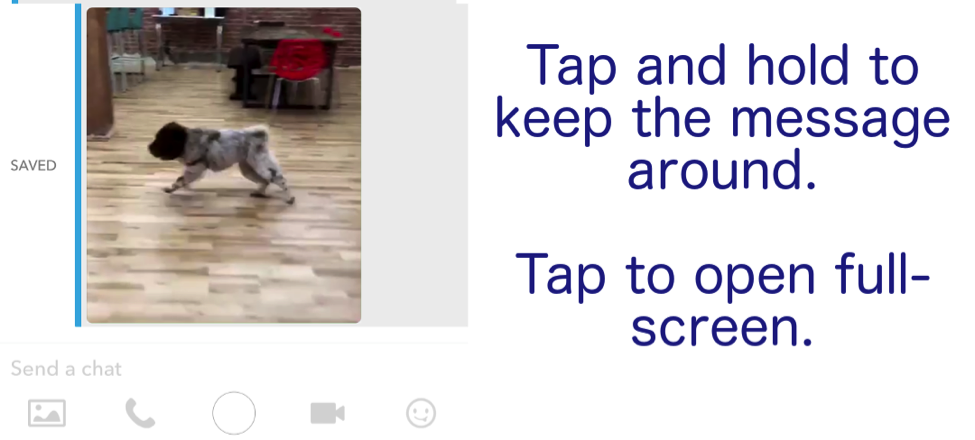
3. In either messaging or Snaps, open and screenshot the content you find engaging or interesting. This may take a bit of time, but there will be a lot less moderation to do on your TrueLoyal if you only grab the cream of the crop from Snapchat.
4. Open the TrueLoyal mobile app and add the screenshot from your gallery as a custom post. If you are in a rush and only plan on displaying images, you can say anything in the “author” and “description” fields.
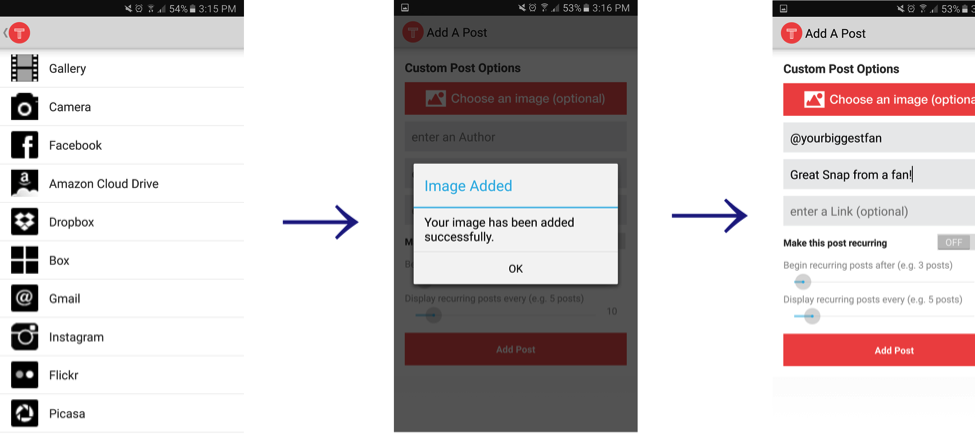
Voila! You have now engaged the growing number of Snapchat users in your audience, established your brand’s presence on the app, and curated valuable community content from an app that is normally closed off to marketers
What are your thoughts on Snapchat? Drop us a line below and share a comment! Also, if you want to learn how TrueLoyal can help with your marketing experiences, feel free to reach out and we’d love to strategize with you!